|
STONES
SOUND STUDIO
Bybee Speaker Bullets and Audio upgrades DIY APPLICATIONS
|
Bybee
DIY
APPLICATIONS Bybee INFORMATION1 Description and Concept Bybee TESTIMONIALS Bybee INFORMATION-2 |
|
STONES
SOUND STUDIO
Bybee Speaker Bullets and Audio upgrades DIY APPLICATIONS
|
Bybee
DIY
APPLICATIONS Bybee INFORMATION1 Description and Concept Bybee TESTIMONIALS Bybee INFORMATION-2 |

News Room and
Bybee Filter upgrades in brief
Loudspeakers Audio, video
and digital inputs and outputs: |
Bybee Slipstream
|
Bybee Slipstream Quantum Purifier
DIY APPLICATIONS
by
Russell Storey
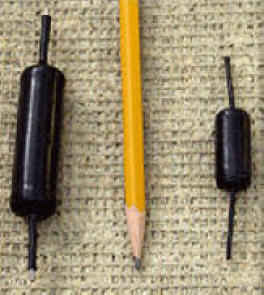
Bybee's current product line supersedes previously released products. The
Quantum Purifiers are primarily intended to be installed internally in any
active device like
AC power Analogue and digital
interconnect cables , speaker crossovers , speaker enclosure terminals, speaker
drivers , speaker cable, amplifier out/ inputs, pre amplifier out/ inputs ,
Digital Home Theatre , RCA and Digital Coax inputs/ outputs
.
Based on my experience with the interconnect purifier, their sonic effect is clearly cumulative with additional devices upstream from the speakers. The magnitude of purity and focus engendered by this device would typically only be the result of a major system upgrade.
""Before you throw a lot of money at your system, give the Purifiers an audition. Go ahead, give your audio system the Windex treatment. If there ever was a no-brainer recommendation, the Bybee Quantum Purifier is it. I can't imagine listening to my system without them. ""
Application 1 :, Speaker
Driver Terminals
As the signal that reaches the speaker driver ( Bass mid ,mid or
Tweeter) has already passed through the noise generating , crossover
components , speaker cable , amplifier ,interconnect cables , sound source , TV
, Music , DVD movie etc , I recommend adding
2
Bybee Slipstream Quantum Purifiers
at the end of the chain
to both + and - terminals of each
speaker driver in the speaker box to gain maximum benefit
Example , Stones Ribbon Speaker Kit HDS 360 or any speaker enclosure
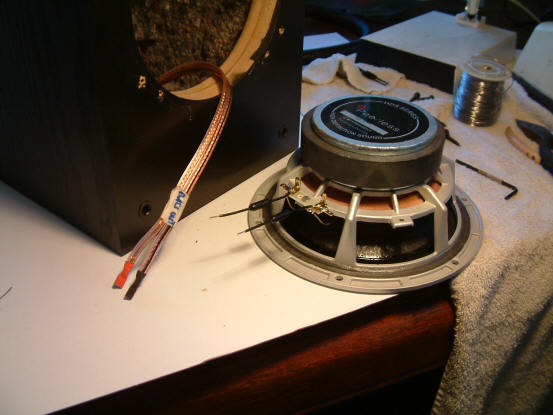
Remove
the + and - wire cables from each speaker driver ( Bass Mid
and tweeter ) and then solder a
Bybee
Slipstream Quantum Purifier on to the
positive and negative terminals as
per photo below . Solder the cables to the Bybee's ,
Solder type: I recommend using Mundorf or Welbourne Labs high quality silver /copper solder . Available from Stones
FYI , Russell Storeys Bybee Rule of thumb Applications based on actual application trials and listening tests 2008
use 2 large bybee filters per driver for 10 or 12’ 15’ 18 “ woofers ,sub woofers , in 2 3 4 way systems speaker systems
use 2 small bybee filters per driver “ 4,5,6,8 woofers , bass / mid , midrange and tweeters in 2 3 4 way systems speaker systems
I use small ybee filters in low level signal wiring feeds inside amplifiers , RCA female chassis sockets and RCA interconnect cables
I recommend "use a qualified electrician " to fit 2 large bybee filters into the active & neutral wiring of the 240V /50Hz mains wall plate which filters all the 240V/50Hz equipment in one hit , turntable ,CD , DVD , Home theatre multi channel receiver amplifier or 2 channel Stereo amplifier, CRT , LCD or Plasma TV
Fit 2 large bybee filters on the 240V A/C input socket inside the individual A/V equipment like turntable ,CD , DVD , Home theatre multi channel receiver amplifier or 2 channel Stereo amplifier, CRT , LCD or Plasma TV
Fit bybee filters in series with any amplifier +/- speaker terminal posts inside the amplifier
Fit bybee filters in series with the ends of the +/- speaker cables connected to the speaker terminal post
Fit bybee filters to the Speaker Enclosure on the back of each +/- terminal post so the bybee filters are fitted in series with the wiring going to the internal crossover unit
My recommended application to enable the best and most dramatic upgrade results
Fit
bybee filters direct to the
Speaker terminals after the crossover
Fit
bybee filters into
Interconnect leads in series with the centre conductor at the
down stream end of the cable . Between Pre amp and power
amplifiers this filters the complete system
PS- have you ever tried adding them to the earth wire of the power supply, YES!!!
, As an experiment I inserted ( 2 small bybees) one in the centre core and one in the earth in an RF 75 ohm coax feed PSU feed to my UHF / VHF Maspro mast head amplifier 20 mtrs away in the garden and bingo better picture and signal . the coax has 22V A/C superimposed on the signal as well , ( RF 180 MHz to 950 MHz + 50 Hz 22V A/C ) quite a test !! The bybees were fitted to the PSU unit in the lounge room
Application 2 : Application 2 : Speaker Enclosure Speaker Terminals, input ( External or (Internal) )
Remove The rear Speaker Terminal ( plate ) from the back of the speaker enclosure (box) . Then solder and fit a Bybee Slipstream Quantum Purifier in series with each speaker terminal wire ( + and - ) ( Bass Mid and tweeter ) see Below
Application 3 : Speaker Enclosure input Speaker Terminals, ( External)
Solder and fit a Bybee Slipstream Quantum Purifier in series with each speaker Cable wire ( + and - ) and attach to each of the Speaker Terminals on the back of the speaker Enclosure (box)
Application 4 : RCA interconnect cable input to Amplifier (1pcs Small Bybee )
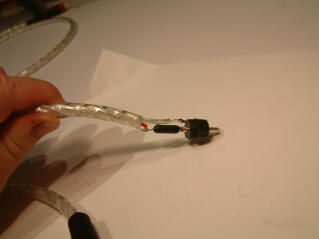
Solder and fit a single Bybee Slipstream Quantum Purifier in series with each ( Left & Right ) RCA interconnect lead centre ( wire) at the male plug centre pin ,Fit at the end of the cable that plugs into your amplifier . Use Eichmann Bullet RCA plugs at both ends of the interconnect cable , Available from Stones
Application 5 : RCA
interconnect input to Amplifier
Bybee Slipstream
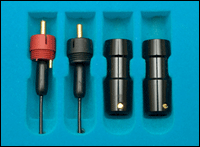
Interconnect Termination Kits
 Each
terminator comprises 2 pcs Eichmann RCA Bullet Plug with a
Slipstream purifiers integrated at the connection point for the signal conductor.
DIY enthusiasts can construct their own interconnect cables, placing these plugs
at either or both ends of the cable, depending on the degree of performance
desired. If only one IC Kit is used for a cable, it should be placed at the
downstream end. For best performance, terminate both ends of the cable with an
IC Terminator.
Each
terminator comprises 2 pcs Eichmann RCA Bullet Plug with a
Slipstream purifiers integrated at the connection point for the signal conductor.
DIY enthusiasts can construct their own interconnect cables, placing these plugs
at either or both ends of the cable, depending on the degree of performance
desired. If only one IC Kit is used for a cable, it should be placed at the
downstream end. For best performance, terminate both ends of the cable with an
IC Terminator.
Code: IC Kit-RCA-Termination
2pcs RCA plug terminated with Small
Bybee Slipstream using Welbourne labs Silver Gold solder
OR
DIY your own buy Eichmann Bullets & Bybee Slipstream Quantum purifier from Stones and solder your own
|






